 クロードスキルのドキュメント
ベストプラクティス
Claude のために、簡潔で信頼性の高い Agent Skills を書く。
Claude が発見し、確実に使える効果的な Skills の書き方を学びます。
良い Skills は、簡潔で、構造が明確で、実際の利用でテストされています。このガイドでは、Claude が発見して効果的に使える Skills を書くための実践的な作成判断を説明します。
Skills の仕組みに関する概念的な背景は、Skills の概要を参照してください。
中核原則
簡潔さが重要
コンテキストウィンドウは共有資源です。あなたの Skill は、Claude が知る必要のある他のすべての情報と同じコンテキストウィンドウを共有します。そこには、システムプロンプト、会話履歴、他の Skills のメタデータ、実際のユーザーリクエストが含まれます。
Skill 内のすべてのトークンが即座にコストになるわけではありません。起動時に事前ロードされるのは、すべての Skills のメタデータ(name と description)だけです。Claude は Skill が関連するときだけ SKILL.md を読み、追加ファイルは必要なときだけ読みます。それでも、SKILL.md を簡潔に保つことは重要です。一度 Claude が読み込めば、そのすべてのトークンが会話履歴や他の文脈と競合します。
基本前提: Claude はすでに非常に賢い。
Claude がすでに持っている知識は追加しないでください。各情報に対して次を問いかけます。
- 「Claude は本当にこの説明を必要としているか?」
- 「Claude がこれを知っていると仮定できるか?」
- 「この段落はトークンコストに見合うか?」
良い例: 簡潔(約 50 tokens):
## Extract PDF text

Use pdfplumber for text extraction:
```python
import pdfplumber

with pdfplumber.open("file.pdf") as pdf:
    text = pdf.pages[0].extract_text()
```
悪い例: 長すぎる(約 150 tokens):
## Extract PDF text

PDF (Portable Document Format) files are a common file format that contains
text, images, and other content. To extract text from a PDF, you'll need to
use a library. There are many libraries available for PDF processing, but we
recommend pdfplumber because it's easy to use and handles most cases well.
First, you'll need to install it using pip. Then you can use the code below...
簡潔な版は、Claude が PDF とは何か、ライブラリがどう働くかを知っている前提にしています。
適切な自由度を設定する
タスクの壊れやすさとばらつきに合わせて、具体性のレベルを調整します。
高い自由度(テキストベースの指示)は、複数の進め方が妥当で、判断が文脈に依存し、ヒューリスティックで進める場合に使います。
## Code review process

1. Analyze the code structure and organization
2. Check for potential bugs or edge cases
3. Suggest improvements for readability and maintainability
4. Verify adherence to project conventions中程度の自由度(疑似コード、またはパラメータ付きスクリプト)は、推奨パターンがあり、一定のばらつきが許容され、設定が挙動に影響する場合に使います。
## Generate report

Use this template and customize as needed:
```python
def generate_report(data, format="markdown", include_charts=True):
    # Process data
    # Generate output in specified format
    # Optionally include visualizations
```低い自由度(具体的なスクリプト、少数またはゼロのパラメータ)は、操作が壊れやすくミスが起きやすい場合、一貫性が重要な場合、特定の順序を守る必要がある場合に使います。
## Database migration

Run exactly this script:
```bash
python scripts/migrate.py --verify --backup
```

Do not modify the command or add additional flags.たとえ: Claude が道を探索するロボットだと考えてください。両側が崖の細い橋では、安全な進み方は 1 つしかありません。厳密なガードレールと正確な指示を与えます(低い自由度)。危険のない広い野原では、成功への道はいくつもあります。方向だけを示し、Claude に最適な進め方を見つけさせます(高い自由度)。
利用予定のすべてのモデルでテストする
Skills はモデルへの追加情報として働くため、効果は基盤モデルに依存します。その Skill を使う予定のすべてのモデルでテストしてください。
- Claude Haiku(高速・低コスト): 十分なガイダンスがあるか?
- Claude Sonnet(バランス型): 明確で効率的か?
- Claude Opus(強力な推論): 説明しすぎていないか?
Opus では完璧に機能する内容でも、Haiku ではもう少し詳細が必要な場合があります。複数モデルで使うなら、どのモデルでもうまく機能する指示を目指してください。
Skill の構造
Note
YAML Frontmatter: SKILL.md の frontmatter は 2 つのフィールドをサポートします。
name- Skill の人間が読める名前(最大 64 文字)description- Skill が何をし、いつ使うべきかを説明する 1 行の説明(最大 1024 文字)
完全な Skill 構造の詳細は、Skills の概要を参照してください。
命名規則
Skills を参照しやすく、議論しやすくするため、一貫した命名パターンを使います。Skill 名には、活動や能力を明確に表す 動名詞形(verb + -ing)を推奨します。
良い命名例(動名詞形):
- "Processing PDFs"
- "Analyzing spreadsheets"
- "Managing databases"
- "Testing code"
- "Writing documentation"
許容される代替案:
- 名詞句: "PDF Processing", "Spreadsheet Analysis"
- 行動指向: "Process PDFs", "Analyze Spreadsheets"
避けるもの:
- 曖昧な名前: "Helper", "Utils", "Tools"
- 汎用すぎる名前: "Documents", "Data", "Files"
- Skill コレクション内で一貫しないパターン
一貫した命名により、ドキュメントや会話で参照しやすくなり、ひと目で何をする Skill か理解でき、複数の Skills を整理・検索しやすくなり、専門的でまとまりのある Skill ライブラリを維持できます。
効果的な description を書く
description フィールドは Skill の発見に使われます。そこには、その Skill が何をするかと、いつ使うべきかの両方を含めます。
Warning
必ず三人称で書いてください。description はシステムプロンプトに注入されます。視点が混ざると、発見に問題が起きることがあります。
- 良い: "Processes Excel files and generates reports"
- 避ける: "I can help you process Excel files"
- 避ける: "You can use this to process Excel files"
具体的に、重要な語句を含める。Skill が何をするかだけでなく、いつ使うべきかを示すトリガーや文脈も入れてください。
各 Skill には description フィールドが 1 つだけあります。description は Skill 選択にとって重要です。Claude は、利用可能な 100 以上の Skills の中から適切な Skill を選ぶためにこれを使います。実装の詳細は SKILL.md の本文に書き、description には Claude がこの Skill をいつ選ぶべきか判断できるだけの情報を入れます。
効果的な例:
PDF Processing skill:
description: Extract text and tables from PDF files, fill forms, merge documents. Use when working with PDF files or when the user mentions PDFs, forms, or document extraction.Excel Analysis skill:
description: Analyze Excel spreadsheets, create pivot tables, generate charts. Use when analyzing Excel files, spreadsheets, tabular data, or .xlsx files.Git Commit Helper skill:
description: Generate descriptive commit messages by analyzing git diffs. Use when the user asks for help writing commit messages or reviewing staged changes.次のような曖昧な description は避けてください。
description: Helps with documentsdescription: Processes datadescription: Does stuff with files段階的開示のパターン
SKILL.md は、オンボーディングガイドの目次のように、必要に応じて詳細資料へ Claude を案内する概要として機能します。段階的開示の仕組みは、概要の Skills の仕組みを参照してください。
実践的なガイダンス:
- 最適な性能のため、SKILL.md 本文は 500 行未満に保つ
- この上限に近づいたら内容を別ファイルに分ける
- 下のパターンを使い、指示、コード、リソースを効果的に整理する
視覚的な概要: 単純な構成から複雑な構成へ
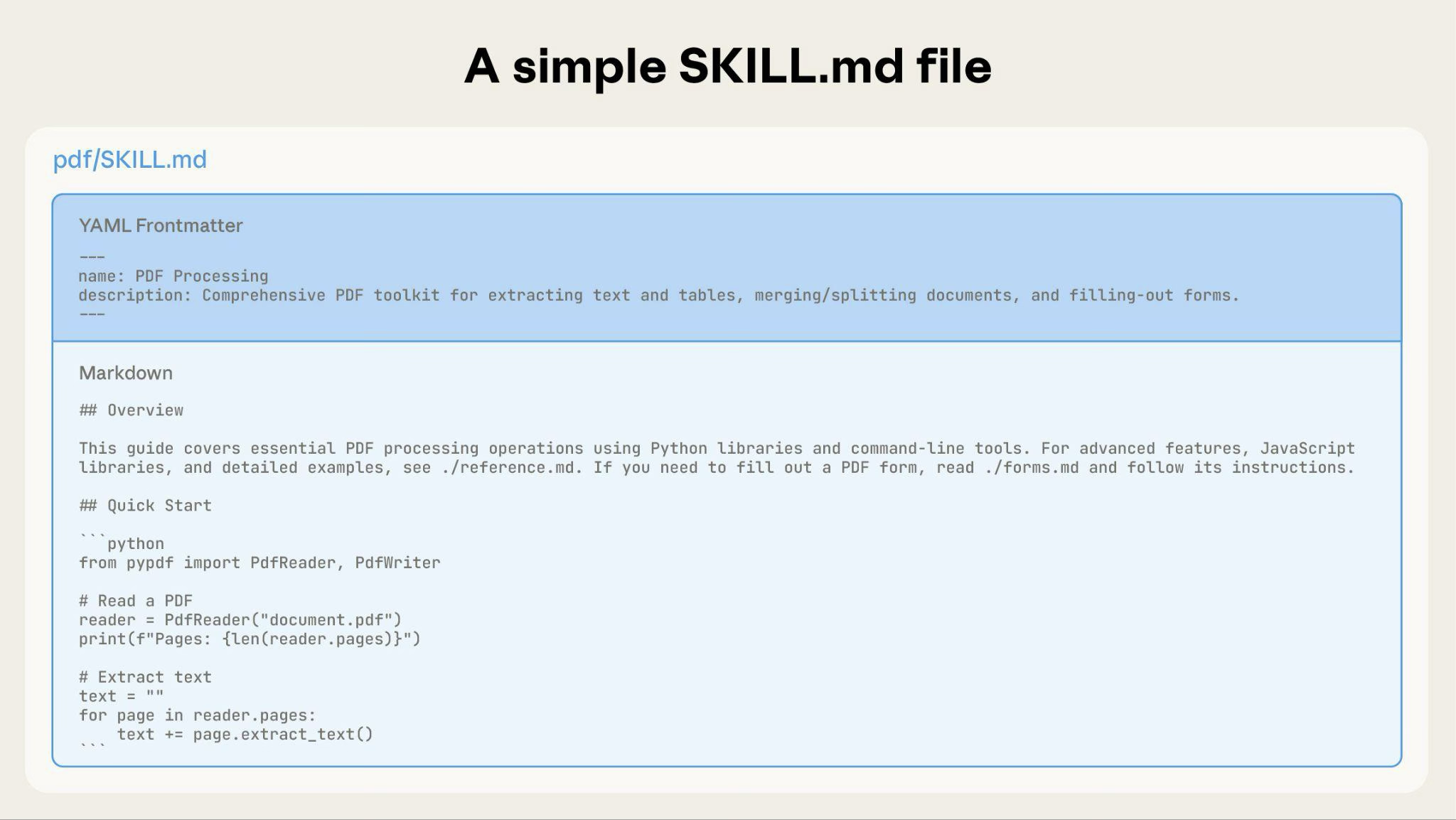
基本的な Skill は、メタデータと指示を含む SKILL.md だけで始まります。
Skill が大きくなるにつれて、Claude が必要なときだけ読み込む追加コンテンツを同梱できます。
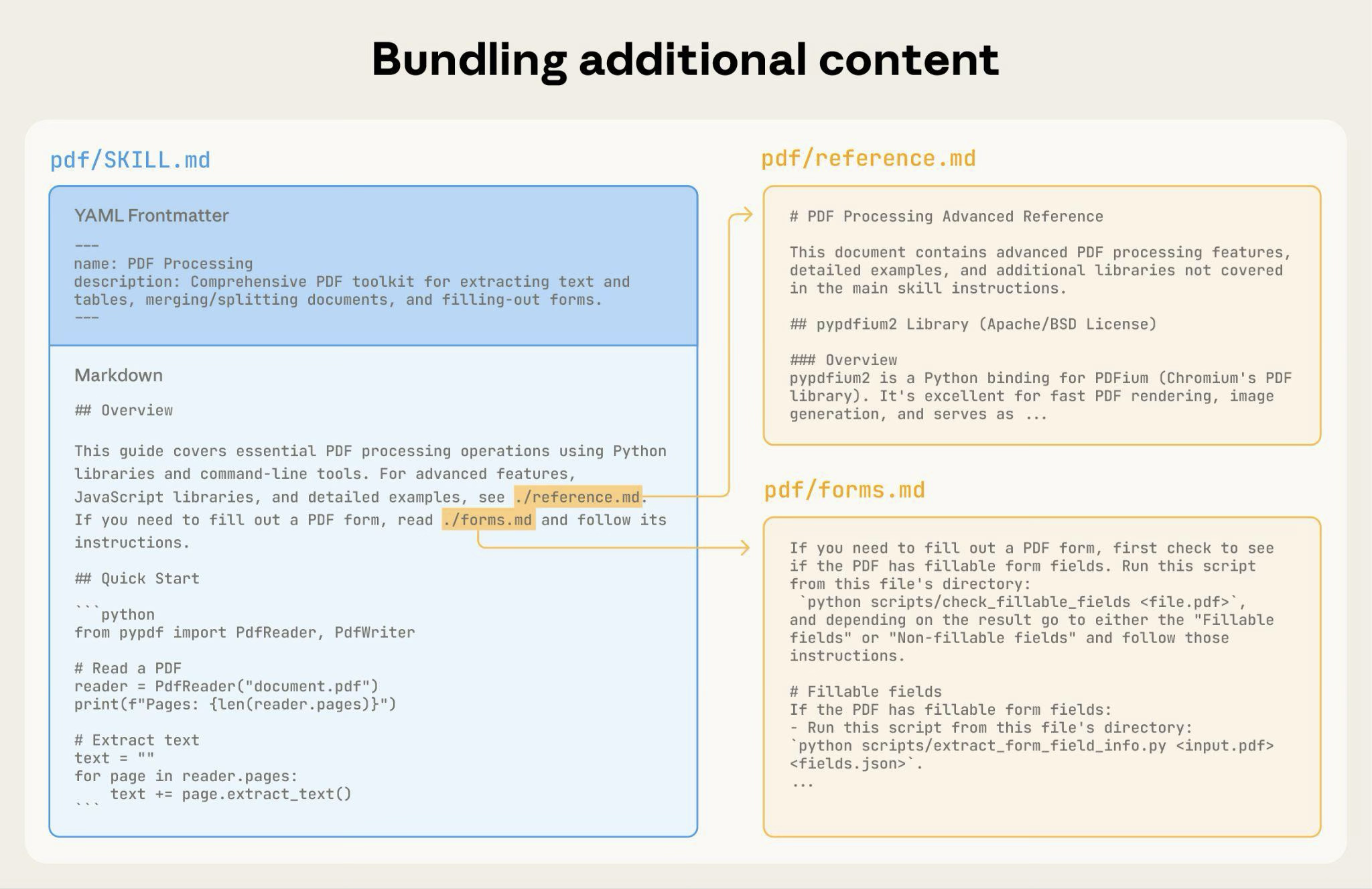
完全な Skill ディレクトリ構造は次のようになります。
pdf/
|-- SKILL.md              # Main instructions (loaded when triggered)
|-- FORMS.md              # Form-filling guide (loaded as needed)
|-- reference.md          # API reference (loaded as needed)
|-- examples.md           # Usage examples (loaded as needed)
`-- scripts/
  |-- analyze_form.py   # Utility script (executed, not loaded)
  |-- fill_form.py      # Form filling script
  `-- validate.py       # Validation script
パターン 1: 参照資料へ案内する高レベルガイド
---
name: PDF Processing
description: Extracts text and tables from PDF files, fills forms, and merges documents. Use when working with PDF files or when the user mentions PDFs, forms, or document extraction.
---

# PDF Processing

## Quick start

Extract text with pdfplumber:
```python
import pdfplumber
with pdfplumber.open("file.pdf") as pdf:
    text = pdf.pages[0].extract_text()
```

## Advanced features

**Form filling**: See [FORMS.md](FORMS.md) for complete guide
**API reference**: See [REFERENCE.md](REFERENCE.md) for all methods
**Examples**: See [EXAMPLES.md](EXAMPLES.md) for common patterns
Claude は必要なときだけ FORMS.md、REFERENCE.md、EXAMPLES.md を読みます。
パターン 2: ドメイン別の整理
複数のドメインを持つ Skills では、関係ない文脈を読み込まないように、ドメインごとに内容を整理します。ユーザーが sales metrics について質問した場合、Claude に必要なのは sales 関連スキーマだけであり、finance や marketing のデータではありません。
bigquery-skill/
|-- SKILL.md (overview and navigation)
`-- reference/
  |-- finance.md (revenue, billing metrics)
  |-- sales.md (opportunities, pipeline)
  |-- product.md (API usage, features)
  `-- marketing.md (campaigns, attribution)
# BigQuery Data Analysis
## Available datasets
**Finance**: Revenue, ARR, billing -> See [reference/finance.md](reference/finance.md)
**Sales**: Opportunities, pipeline, accounts -> See [reference/sales.md](reference/sales.md)
**Product**: API usage, features, adoption -> See [reference/product.md](reference/product.md)
**Marketing**: Campaigns, attribution, email -> See [reference/marketing.md](reference/marketing.md)
## Quick search
Find specific metrics using grep:
```bash
grep -i "revenue" reference/finance.md
grep -i "pipeline" reference/sales.md
grep -i "api usage" reference/product.md
```パターン 3: 条件付きの詳細
基本内容を示し、高度な内容へリンクします。
# DOCX Processing

## Creating documents

Use docx-js for new documents. See [DOCX-JS.md](DOCX-JS.md).

## Editing documents

For simple edits, modify the XML directly.

**For tracked changes**: See [REDLINING.md](REDLINING.md)
**For OOXML details**: See [OOXML.md](OOXML.md)
Claude はユーザーがその機能を必要とするときだけ REDLINING.md や OOXML.md を読みます。
深くネストした参照を避ける
Claude は、参照ファイルからさらに参照されたファイルを読むとき、部分的にしか読まないことがあります。ネストした参照に遭遇すると、Claude は全体を読む代わりに head -100 のようなコマンドで内容を確認し、不完全な情報になることがあります。
参照は SKILL.md から 1 階層に保ってください。すべての参照ファイルは SKILL.md から直接リンクし、必要なときに Claude が完全なファイルを読めるようにします。
悪い例: 深すぎる:
# SKILL.md
See [advanced.md](advanced.md)...

# advanced.md
See [details.md](details.md)...

# details.md
Here's the actual information...
良い例: 1 階層:
# SKILL.md

**Basic usage**: [instructions in SKILL.md]
**Advanced features**: See [advanced.md](advanced.md)
**API reference**: See [reference.md](reference.md)
**Examples**: See [examples.md](examples.md)
長い参照ファイルには目次を付ける
100 行を超える参照ファイルでは、先頭に目次を含めてください。これにより、Claude が部分読みをしている場合でも、利用可能な情報の全体像を把握できます。
# API Reference

## Contents
- Authentication and setup
- Core methods (create, read, update, delete)
- Advanced features (batch operations, webhooks)
- Error handling patterns
- Code examples

## Authentication and setup
...

## Core methods
...
その後、Claude は必要に応じてファイル全体を読んだり、特定のセクションへ移動したりできます。ファイルシステムベースのアーキテクチャが段階的開示を可能にする詳細は、後半の Advanced セクションにある Runtime environment を参照してください。
ワークフローとフィードバックループ
複雑なタスクにはワークフローを使う
複雑な操作は、明確で順序立ったステップに分解します。特に複雑なワークフローでは、Claude が回答にコピーして進捗をチェックできるチェックリストを提供します。
例 1: 調査統合ワークフロー(コードを使わない Skills):
## Research synthesis workflow

Copy this checklist and track your progress:
```
Research Progress:
- [ ] Step 1: Read all source documents
- [ ] Step 2: Identify key themes
- [ ] Step 3: Cross-reference claims
- [ ] Step 4: Create structured summary
- [ ] Step 5: Verify citations
```

**Step 1: Read all source documents**

Review each document in the `sources/` directory. Note the main arguments and supporting evidence.

**Step 2: Identify key themes**

Look for patterns across sources. What themes appear repeatedly? Where do sources agree or disagree?

**Step 3: Cross-reference claims**

For each major claim, verify it appears in the source material. Note which source supports each point.

**Step 4: Create structured summary**

Organize findings by theme. Include:
- Main claim
- Supporting evidence from sources
- Conflicting viewpoints (if any)

**Step 5: Verify citations**

Check that every claim references the correct source document. If citations are incomplete, return to Step 3.
この例は、コードを必要としない分析タスクにもワークフローが適用できることを示します。チェックリストパターンは、複雑で複数ステップの任意のプロセスに使えます。
例 2: PDF フォーム入力ワークフロー(コードを使う Skills):
## PDF form filling workflow

Copy this checklist and check off items as you complete them:
```
Task Progress:
- [ ] Step 1: Analyze the form (run analyze_form.py)
- [ ] Step 2: Create field mapping (edit fields.json)
- [ ] Step 3: Validate mapping (run validate_fields.py)
- [ ] Step 4: Fill the form (run fill_form.py)
- [ ] Step 5: Verify output (run verify_output.py)
```

**Step 1: Analyze the form**

Run: `python scripts/analyze_form.py input.pdf`

This extracts form fields and their locations, saving to `fields.json`.

**Step 2: Create field mapping**

Edit `fields.json` to add values for each field.

**Step 3: Validate mapping**

Run: `python scripts/validate_fields.py fields.json`

Fix any validation errors before continuing.

**Step 4: Fill the form**

Run: `python scripts/fill_form.py input.pdf fields.json output.pdf`

**Step 5: Verify output**

Run: `python scripts/verify_output.py output.pdf`

If verification fails, return to Step 2.
明確なステップにより、Claude が重要な検証を飛ばすことを防げます。チェックリストは Claude とユーザーの双方が複数ステップの進捗を追跡する助けになります。
フィードバックループを実装する
一般的なパターン: バリデータを実行 -> エラーを修正 -> 繰り返す。
このパターンは出力品質を大きく向上させます。
例 1: スタイルガイド準拠(コードを使わない Skills):
## Content review process

1. Draft your content following the guidelines in STYLE_GUIDE.md
2. Review against the checklist:
 - Check terminology consistency
 - Verify examples follow the standard format
 - Confirm all required sections are present
3. If issues found:
 - Note each issue with specific section reference
 - Revise the content
 - Review the checklist again
4. Only proceed when all requirements are met
5. Finalize and save the document
この例では、スクリプトの代わりに参照ドキュメントを使った検証ループを示しています。「バリデータ」は STYLE_GUIDE.md であり、Claude がそれを読み比べて確認します。
例 2: ドキュメント編集プロセス(コードを使う Skills):
## Document editing process

1. Make your edits to `word/document.xml`
2. **Validate immediately**: `python ooxml/scripts/validate.py unpacked_dir/`
3. If validation fails:
 - Review the error message carefully
 - Fix the issues in the XML
 - Run validation again
4. **Only proceed when validation passes**
5. Rebuild: `python ooxml/scripts/pack.py unpacked_dir/ output.docx`
6. Test the output document
検証ループはエラーを早期に捕まえます。
コンテンツガイドライン
時間依存の情報を避ける
古くなる情報は含めないでください。
悪い例: 時間依存:
If you're doing this before August 2025, use the old API.
After August 2025, use the new API.良い例:
## Current method

Use the v2 API endpoint: `api.example.com/v2/messages`

## Old patterns

<details>
<summary>Legacy v1 API (deprecated 2025-08)</summary>

The v1 API used: `api.example.com/v1/messages`

This endpoint is no longer supported.
</details>
古いパターンを別セクションにすると、メインの内容を散らかさずに歴史的文脈を残せます。
用語を一貫させる
1 つの用語を選び、Skill 全体で使い続けてください。
良い例 - 一貫:
- 常に "API endpoint"
- 常に "field"
- 常に "extract"
悪い例 - 不一致:
- "API endpoint", "URL", "API route", "path" が混在
- "field", "box", "element", "control" が混在
- "extract", "pull", "get", "retrieve" が混在
一貫性は Claude が指示を理解し、従う助けになります。
よく使うパターン
テンプレートパターン
出力形式のテンプレートを提供します。必要な厳密さに合わせてテンプレートの拘束力を調整します。
厳密な要件向け:
## Report structure

ALWAYS use this exact template structure:
```markdown
# [Analysis Title]

## Executive summary
[One-paragraph overview of key findings]

## Key findings
- Finding 1 with supporting data
- Finding 2 with supporting data
- Finding 3 with supporting data

## Recommendations
1. Specific actionable recommendation
2. Specific actionable recommendation
```柔軟なガイダンス向け:
## Report structure

Here is a sensible default format, but use your best judgment based on the analysis:
```markdown
# [Analysis Title]

## Executive summary
[Overview]

## Key findings
[Adapt sections based on what you discover]

## Recommendations
[Tailor to the specific context]
```

Adjust sections as needed for the specific analysis type.
例示パターン
出力品質が例を見ることに依存する Skills では、通常のプロンプトと同じように入力/出力ペアを提供します。
## Commit message format

Generate commit messages following these examples:

**Example 1:**
Input: Added user authentication with JWT tokens
Output:
```
feat(auth): implement JWT-based authentication

Add login endpoint and token validation middleware
```

**Example 2:**
Input: Fixed bug where dates displayed incorrectly in reports
Output:
```
fix(reports): correct date formatting in timezone conversion

Use UTC timestamps consistently across report generation
```

**Example 3:**
Input: Updated dependencies and refactored error handling
Output:
```
chore: update dependencies and refactor error handling

- Upgrade lodash to 4.17.21
- Standardize error response format across endpoints
```

Follow this style: type(scope): brief description, then detailed explanation.
例は、説明だけよりも望ましいスタイルと詳細度を明確に伝えます。
条件付きワークフローパターン
判断ポイントを通じて Claude を導きます。
## Document modification workflow

1. Determine the modification type:

 **Creating new content?** -> Follow "Creation workflow" below
 **Editing existing content?** -> Follow "Editing workflow" below

2. Creation workflow:
 - Use docx-js library
 - Build document from scratch
 - Export to .docx format

3. Editing workflow:
 - Unpack existing document
 - Modify XML directly
 - Validate after each change
 - Repack when complete
Tip
ワークフローが多くのステップを含んで大きく複雑になる場合は、別ファイルへ移し、タスクに応じて適切なファイルを読むよう Claude に伝えることを検討してください。
評価と反復
まず評価を作る
大規模なドキュメントを書く前に評価を作成してください。これにより、想像上の要件ではなく、実際の問題を Skill が解決していることを確認できます。
評価駆動開発:
- ギャップを特定する: Skill なしで代表的なタスクを Claude に実行させ、失敗や不足文脈を記録する
- 評価を作る: そのギャップをテストする 3 つのシナリオを作る
- ベースラインを確立する: Skill なしの Claude の性能を測る
- 最小限の指示を書く: ギャップを埋め、評価に通るだけの内容を作る
- 反復する: 評価を実行し、ベースラインと比較し、改善する
この方法は、実際には起きない要件を先回りして文書化するのではなく、本当の問題を解いていることを保証します。
評価構造:
{
"skills": ["pdf-processing"],
"query": "Extract all text from this PDF file and save it to output.txt",
"files": ["test-files/document.pdf"],
"expected_behavior": [
  "Successfully reads the PDF file using an appropriate PDF processing library or command-line tool",
  "Extracts text content from all pages in the document without missing any pages",
  "Saves the extracted text to a file named output.txt in a clear, readable format"
]
}
Note
この例は、単純なテスト基準を持つデータ駆動評価を示しています。現在、これらの評価を実行する組み込み手段は提供していません。ユーザーは独自の評価システムを作れます。評価は Skill の効果を測る真実の基準です。
Claude と反復的に Skills を開発する
最も効果的な Skill 開発プロセスには Claude 自身が含まれます。Claude の 1 つのインスタンス(「Claude A」)と協力して、別のインスタンス(「Claude B」)が使う Skill を作ります。Claude A は指示の設計と改善を助け、Claude B は実タスクでそれをテストします。Claude モデルは、効果的なエージェント指示の書き方と、エージェントに必要な情報の両方を理解しているためです。
新しい Skill を作る流れ:
- Skill なしでタスクを完了する: 通常のプロンプトで Claude A と問題を解きます。その過程で、文脈、好み、手順知識を自然に与えることになります。繰り返し提供している情報に注目します。
- 再利用可能なパターンを特定する: タスク完了後、将来の類似タスクに役立つ文脈を特定します。BigQuery 分析なら、テーブル名、フィールド定義、フィルタ規則(例: "always exclude test accounts")、よく使うクエリパターンなどです。
- Claude A に Skill を作らせる: 「いま使った BigQuery 分析パターンを捉える Skill を作って。テーブルスキーマ、命名規則、テストアカウントを除外するルールを含めて」と依頼します。
- 簡潔さをレビューする: Claude A が不要な説明を追加していないか確認します。「win rate の意味の説明は削って。Claude はすでに知っている」と依頼できます。
- 情報設計を改善する: たとえば「テーブルスキーマは別の参照ファイルに分けて。後でテーブルが増えるかもしれない」と頼みます。
- 類似タスクでテストする: Skill を読み込んだ新しい Claude B で関連ユースケースを試し、正しい情報を見つけ、ルールを適用し、タスクを成功させるか観察します。
- 観察に基づいて反復する: Claude B が困ったり見落としたりしたら、具体的に Claude A へ戻します。「Q4 の日付フィルタを忘れた。date filtering patterns を追加すべき?」などです。
Tip
Claude モデルは Skill の形式と構造を自然に理解しています。特別な system prompt や "writing skills" Skill は不要です。単に Skill を作るよう依頼すれば、適切な frontmatter と本文を持つ SKILL.md を生成できます。
既存 Skills を改善する場合も同じ階層パターンを続けます。Claude A と改善し、Claude B で実作業を行い、Claude B の挙動を観察して Claude A へ戻します。
- 実ワークフローで Skill を使う
- Claude B がどこで困るか、成功するか、予想外の選択をするか観察する
- 現在の SKILL.md と観察結果を Claude A に共有して改善を頼む
- Claude A の提案をレビューする。ルールを目立たせる、"always filter" を "MUST filter" に変える、ワークフローを再構成する、といった提案があり得ます
- 変更を適用し、同様のリクエストで Claude B を再テストする
- 新しいシナリオに出会うたび、この観察・改善・テストのサイクルを繰り返す
チームからのフィードバック:
- Skills をチームメイトと共有し、使い方を観察する
- 期待どおりに Skill が起動するか、指示は明確か、何が不足しているかを聞く
- 自分の利用パターンでは見えない盲点を補うためにフィードバックを取り入れる
この方法が機能する理由: Claude A はエージェントの必要を理解し、あなたはドメイン専門知識を提供し、Claude B は実利用を通してギャップを明らかにします。観察に基づく反復改善は、仮定よりも良い Skills につながります。
Claude が Skills をどうたどるか観察する
Skills を反復する際は、Claude が実際にどう使うかに注目します。
- 予想外の探索経路: Claude が想定外の順序でファイルを読む場合、構造が思ったほど直感的ではない可能性があります
- 見落とされたつながり: 重要ファイルへの参照をたどらない場合、リンクをもっと明示的または目立つ位置にする必要があります
- 特定セクションへの過度な依存: 同じファイルを繰り返し読むなら、その内容をメインの SKILL.md に入れるべきかもしれません
- 無視される内容: 同梱ファイルに一度もアクセスしないなら、不要か、メイン指示での示し方が弱い可能性があります
仮定ではなく観察に基づいて反復してください。Skill メタデータの name と description は特に重要です。Claude は現在のタスクに応じて Skill を起動するか判断するときにこれらを使います。
避けるべきアンチパターン
Windows 形式のパスを避ける
Windows 上でも、ファイルパスには必ずスラッシュを使ってください。
- 良い:
scripts/helper.py,reference/guide.md - 避ける:
scripts\helper.py,reference\guide.md
Unix 形式のパスはすべてのプラットフォームで動作しますが、Windows 形式のパスは Unix システムでエラーになります。
選択肢を増やしすぎない
必要でない限り、複数のアプローチを提示しないでください。
**Bad example: Too many choices** (confusing):
"You can use pypdf, or pdfplumber, or PyMuPDF, or pdf2image, or..."

**Good example: Provide a default** (with escape hatch):
"Use pdfplumber for text extraction:
```python
import pdfplumber
```

For scanned PDFs requiring OCR, use pdf2image with pytesseract instead."
Advanced: 実行可能コードを含む Skills
以下のセクションは、実行可能スクリプトを含む Skills に焦点を当てます。Markdown の指示だけを使う Skill なら、効果的な Skills のチェックリストへ進んでください。
丸投げせず、解決する
Skills 用のスクリプトを書くときは、エラー条件を Claude に丸投げせず、スクリプト側で扱います。
良い例: エラーを明示的に処理する:
def process_file(path):
  """Process a file, creating it if it doesn't exist."""
  try:
      with open(path) as f:
          return f.read()
  except FileNotFoundError:
      # Create file with default content instead of failing
      print(f"File {path} not found, creating default")
      with open(path, 'w') as f:
          f.write('')
      return ''
  except PermissionError:
      # Provide alternative instead of failing
      print(f"Cannot access {path}, using default")
      return ''
悪い例: Claude に丸投げ:
def process_file(path):
  # Just fail and let Claude figure it out
  return open(path).read()
設定パラメータも、"voodoo constants"(Ousterhout の法則)を避けるため、理由を示して文書化してください。正しい値が自分にも分からないなら、Claude はどうやって決めるのでしょうか。
良い例: 自己説明的:
# HTTP requests typically complete within 30 seconds
# Longer timeout accounts for slow connections
REQUEST_TIMEOUT = 30

# Three retries balances reliability vs speed
# Most intermittent failures resolve by the second retry
MAX_RETRIES = 3
悪い例: マジックナンバー:
TIMEOUT = 47  # Why 47?
RETRIES = 5   # Why 5?
ユーティリティスクリプトを提供する
Claude がスクリプトを書ける場合でも、事前に用意したスクリプトには利点があります。
- 生成コードより信頼性が高い
- トークンを節約できる(コードをコンテキストに含める必要がない)
- 時間を節約できる(コード生成が不要)
- 利用ごとの一貫性を保証できる
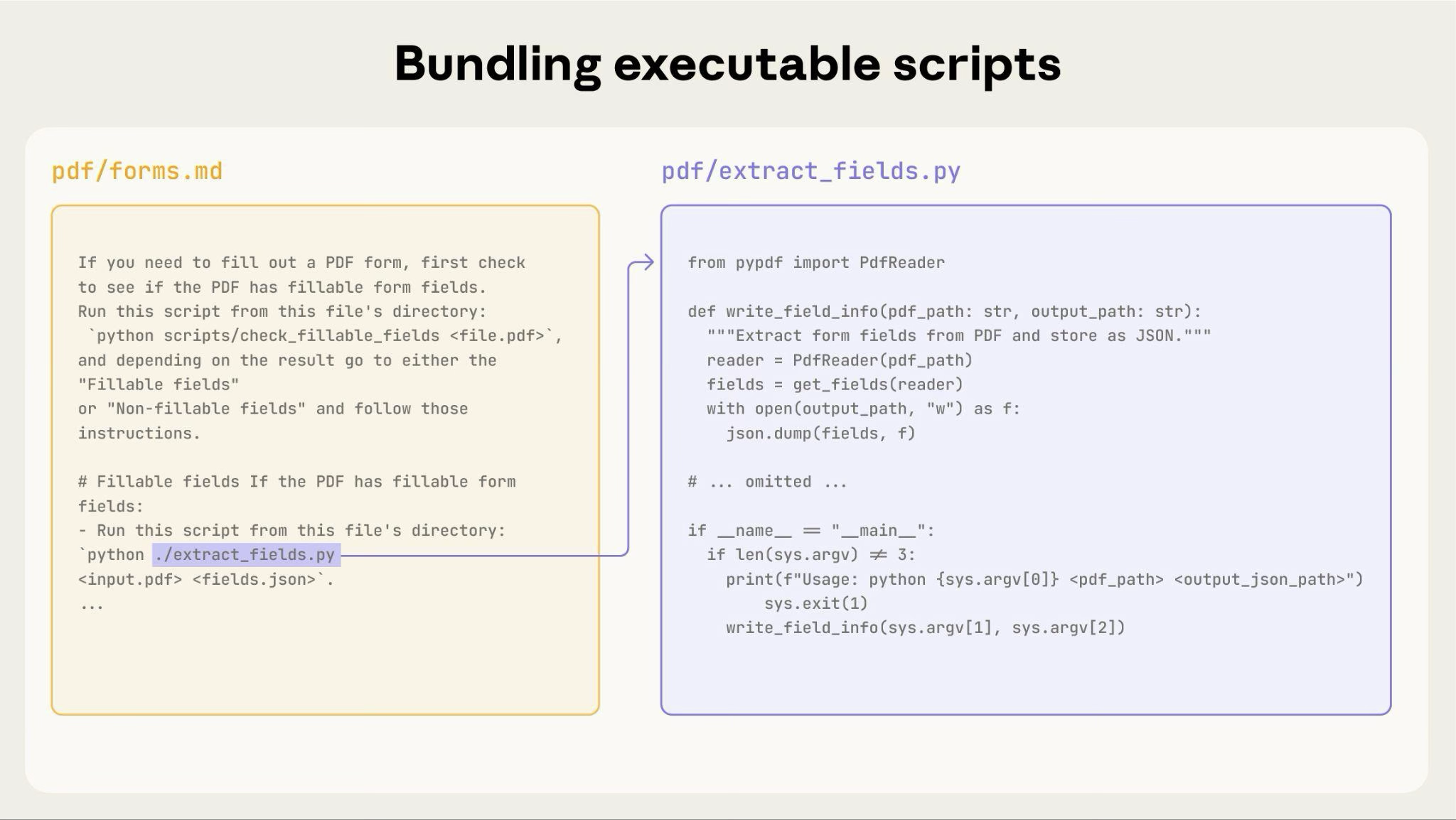
上の図は、実行可能スクリプトが指示ファイルとどのように連携するかを示します。指示ファイル(forms.md)がスクリプトを参照し、Claude はその内容をコンテキストに読み込まずに実行できます。
重要な区別: 指示では、Claude がスクリプトを 実行する のか、複雑なロジックの参照として 読む のかを明確にしてください。多くのユーティリティスクリプトでは、実行の方が信頼性と効率に優れます。
## Utility scripts

**analyze_form.py**: Extract all form fields from PDF
```bash
python scripts/analyze_form.py input.pdf > fields.json
```

Output format:
```json
{
  "field_name": {"type": "text", "x": 100, "y": 200},
  "signature": {"type": "sig", "x": 150, "y": 500}
}
```

**validate_boxes.py**: Check for overlapping bounding boxes
```bash
python scripts/validate_boxes.py fields.json
# Returns: "OK" or lists conflicts
```

**fill_form.py**: Apply field values to PDF
```bash
python scripts/fill_form.py input.pdf fields.json output.pdf
```
視覚分析を使う
入力を画像としてレンダリングできる場合は、Claude に視覚的に分析させます。
## Form layout analysis

1. Convert PDF to images:
```bash
   python scripts/pdf_to_images.py form.pdf
```

2. Analyze each page image to identify form fields
3. Claude can see field locations and types visually
Note
この例では pdf_to_images.py スクリプトを書く必要があります。
Claude の視覚能力はレイアウトや構造の理解に役立ちます。
検証可能な中間出力を作る
Claude が複雑で自由度の高いタスクを行うと、ミスが起きることがあります。"plan-validate-execute" パターンでは、まず構造化形式で計画を作り、それをスクリプトで検証してから実行することで、早期に誤りを捕まえます。
例: スプレッドシートに基づいて PDF の 50 個のフォームフィールドを更新するよう Claude に依頼したとします。検証なしでは、存在しないフィールドを参照したり、競合する値を作ったり、必須フィールドを見落としたり、更新を誤って適用したりする可能性があります。
解決策: 上の PDF フォーム入力ワークフローを使い、変更を適用する前に検証される中間 changes.json ファイルを追加します。流れは analyze -> create plan file -> validate plan -> execute -> verify になります。
このパターンが機能する理由:
- 早期にエラーを捕まえる: 変更適用前に問題を見つける
- 機械的に検証できる: スクリプトが客観的な確認を提供する
- 元ファイルを触らずに計画を反復できる
- デバッグが明確: エラーメッセージが具体的な問題を指す
使うべき場面: バッチ操作、破壊的変更、複雑な検証規則、重要度の高い操作。
実装のヒント: 検証スクリプトは、Claude が修正しやすいように具体的で冗長なエラーメッセージを出すようにします。例: "Field 'signature_date' not found. Available fields: customer_name, order_total, signature_date_signed"。
依存関係をパッケージする
Skills はコード実行環境で動作し、プラットフォーム固有の制限があります。
- claude.ai: npm と PyPI からパッケージをインストールでき、GitHub リポジトリから取得できます
- Anthropic API: ネットワークアクセスがなく、実行時のパッケージインストールもできません
必要なパッケージを SKILL.md に列挙し、コード実行ツールのドキュメントで利用可能か確認してください。
ランタイム環境
Skills は、ファイルシステムアクセス、bash コマンド、コード実行能力を持つコード実行環境で動作します。このアーキテクチャの概念説明は、概要の Skills のアーキテクチャを参照してください。
作成に与える影響:
- メタデータは事前ロード: 起動時、すべての Skills の YAML frontmatter にある name と description がシステムプロンプトに入ります
- ファイルはオンデマンドで読む: Claude は必要なときに bash Read ツールで SKILL.md や他のファイルへアクセスします
- スクリプトは効率的に実行: ユーティリティスクリプトは内容全体をコンテキストに入れずに bash で実行できます。トークンを消費するのは出力だけです
- 大きなファイルにもコンテキストペナルティなし: 参照ファイル、データ、ドキュメントは読まれるまでトークンを消費しません
- ファイルパスは重要: スラッシュを使い、バックスラッシュは使わない
- 説明的なファイル名を使う:
form_validation_rules.mdのように内容が分かる名前にする - 発見しやすく整理する: ドメインや機能ごとにディレクトリを構成する
- 包括的なリソースを同梱する: API ドキュメント、豊富な例、大きなデータセットを含めても、アクセスされるまでコストはありません
- 決定的な操作にはスクリプトを優先する
- 実行意図を明確にする: "Run
analyze_form.py" と "Seeanalyze_form.py" は違います - ファイルアクセスパターンをテストする: 実リクエストで Claude がディレクトリ構造をたどれるか確認します
bigquery-skill/
|-- SKILL.md (overview, points to reference files)
`-- reference/
  |-- finance.md (revenue metrics)
  |-- sales.md (pipeline data)
  `-- product.md (usage analytics)
ユーザーが revenue について尋ねると、Claude は SKILL.md を読み、reference/finance.md への参照を見て、そのファイルだけを bash で読みます。sales.md と product.md は必要になるまでファイルシステム上に残り、コンテキストトークンを消費しません。
MCP tool references
Skill が MCP (Model Context Protocol) ツールを使う場合、"tool not found" エラーを避けるため、必ず完全修飾ツール名を使います。
形式: ServerName:tool_name
Use the BigQuery:bigquery_schema tool to retrieve table schemas.
Use the GitHub:create_issue tool to create issues.
BigQuery と GitHub は MCP サーバー名、bigquery_schema と create_issue は各サーバー内のツール名です。サーバープレフィックスがないと、複数の MCP サーバーがある場合に Claude がツールを見つけられないことがあります。
ツールがインストール済みだと仮定しない
パッケージが利用可能だと仮定しないでください。
**Bad example: Assumes installation**:
"Use the pdf library to process the file."

**Good example: Explicit about dependencies**:
"Install required package: `pip install pypdf`

Then use it:
```python
from pypdf import PdfReader
reader = PdfReader("file.pdf")
```
技術メモ
YAML frontmatter 要件
SKILL.md の frontmatter には name(最大 64 文字)と description(最大 1024 文字)だけが含まれます。完全な構造の詳細は Skills の概要を参照してください。
トークン予算
最適な性能のため、SKILL.md 本文は 500 行未満に保ちます。超える場合は、前述の段階的開示パターンを使って別ファイルに分けます。アーキテクチャの詳細は Skills の概要を参照してください。
効果的な Skills のチェックリスト
Skill を共有する前に確認します。
中核品質
- Description が具体的で、重要語句を含んでいる
- Description が Skill の内容と使用タイミングの両方を含んでいる
- SKILL.md 本文が 500 行未満
- 必要なら追加詳細が別ファイルにある
- 時間依存情報がない(または "old patterns" セクションにある)
- 用語が一貫している
- 例が抽象的でなく具体的
- ファイル参照が 1 階層
- 段階的開示が適切に使われている
- ワークフローのステップが明確
コードとスクリプト
- スクリプトが Claude に丸投げせず問題を解決する
- エラー処理が明示的で役に立つ
- "voodoo constants" がない(すべての値に理由がある)
- 必要パッケージが指示に列挙され、利用可能性が確認されている
- スクリプトに明確なドキュメントがある
- Windows 形式のパスがない(すべてスラッシュ)
- 重要操作に検証ステップがある
- 品質が重要なタスクにフィードバックループが含まれる
テスト
- 少なくとも 3 つの評価を作成した
- Haiku、Sonnet、Opus でテストした
- 実利用シナリオでテストした
- 該当する場合、チームのフィードバックを取り入れた